🚲 Before Starting Your Trip
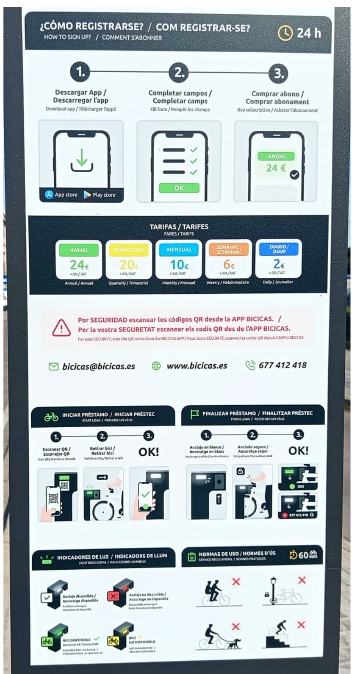
- Open the app and scan the bicycle’s QR code.
- Remove the bicycle once it has been unlocked.
- Check the brakes, tyres, lights, and adjust the saddle if necessary.
- If you detect any issue, return the bicycle and report the incident to the service team (via the app, phone, or email).
⏱️ Maximum Usage Time
Each rental has a maximum duration of 1 hour.
If you need to continue using the service, return the bicycle to a station and start a new rental.
👤 Your Account Is Personal
Your Bicicas account is personal and non-transferable.
Do not share your account, app, or service access with other people. The account holder is responsible for all usage carried out through their account.
📍 Always Use Bicicas Stations
Bicycles must be collected and returned only at authorised Bicicas stations.
❌ Not Allowed
- Reserving a bicycle for exclusive personal use.
- Leaving a bicycle in building entrances, homes, or shops.
- Abandoning a bicycle outside a station.
✅ How to Correctly End a Rental
- Insert the bicycle correctly into the docking point.
- Push it fully into place.
- Check that it is locked.
- Verify the LED colour.
- Confirm in the app that the trip has ended.
⚠️ Remember
Before leaving the station, always check that the LED is GREEN and that the rental appears as completed in the app.
Significance of Docking Point LED Colours
🟢 Green: Bicycle available / rental ended correctly.
⚪ White: Docking point available / rental still active.
Check that the bicycle is properly locked and contact customer support or send a photograph (via WhatsApp) showing both the bicycle and the station.
🔴 Red: Docking point unavailable / the bicycle has not been docked correctly. Remove it and dock it again.
🟡 Yellow: Bicycle unavailable due to an incident and awaiting technical inspection.
🔧 Report Any Incident
If you detect a problem, access the “Incidents” section in the app and enter the bicycle number. Your report helps us maintain the service in the best possible condition.
🚦 Ride Safely
- Follow traffic regulations.
- Use cycle lanes whenever possible.
- Adjust your speed to the surroundings.
- Do not use your mobile phone while riding.
- Take extra care at junctions and pedestrian areas.
📞 Customer Service
Phone & WhatsApp: 677 412 418
Office Hours:
Monday to Friday, from 7:00 a.m. to 7:00 p.m.
Email: bicicas@bicicas.es
🚲 Together we make Bicicas better. Your cooperation helps maintain a sustainable, safe, and accessible service for everyone.
Leave a Reply